

How to take a Screenshot
This document describes how to capture screenshots in Windows, iPhone/Mac, Android, BlackBerry. Capture your screen, or partial screen on the following devices:
Windows 7 Screenshot
Press the Print Screen
(sometimes marked as PrtSc or PrtScn) key on the keyboard (generally located in the top right hand corner) to capture an image of the entire screen and store it in the Windows clipboard.
Press Alt & Print Screen
(sometimes labeled as PrtScn) to capture an image of only the active window and store it in the Windows clipboard.
When the desired image is stored in the Windows clipboard (only one image can be stored at a time), it can be extracted by opening a word process program (Microsoft Word, Microsoft Publisher, etc.) or an image manipulation program (such as Adobe Photoshop or Microsoft Paint), and selecting Paste from the Edit menu or pressing Ctrl-V.
Windows 7 – Snipping Tool
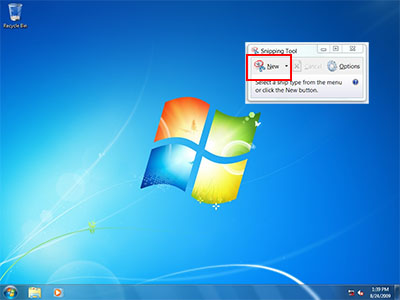
Click on the Start button to open your Start Menu and type SNIPPING, or;

- Then click on the All Programs menu option.
- Then click on the Accessories group
- Finally click on the the Snipping Tool icon which looks like this:

http://windows.microsoft.com/en-CA/windows7/products/features/snipping-tool
Microsoft Windows take a screen capture
iPhone Screenshot
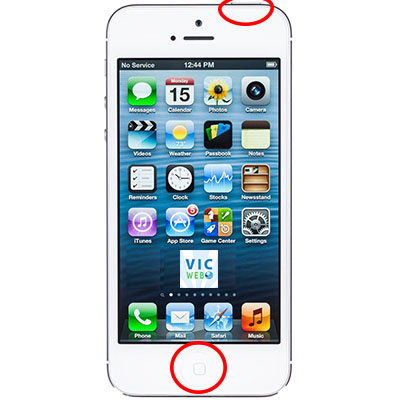
HOME + SLEEP
To take a screenshot with your iPhone or iPod Touch, just press the Home and Sleep buttons at the same time. If you nail the timing, the screen will flash and you’ll hear the same camera shutter sound that the Camera app makes when you take a photo.
To access and share your screenshots, go to Photos and open the Camera Roll.
Currently iOS 7
Mac Screenshot
Capture your entire screen
Press Command (⌘)-Shift-3. The screenshot is added to your desktop.
Capture some of your screen
Press Command (⌘)-Shift-4, and then drag the crosshair pointer to select the area. Hold Shift, Option, or the Space bar while you drag to resize the selection area. To cancel, press Escape (esc) before you release the mouse button.


Capture a specific window
Press Command (⌘)-Shift-4, press the Space bar, move the camera pointer over the window to highlight it, and then click.
For more visit Apple Support
BlackBerry Screenshot
Take a screen shot of your device
Volume Up + Volume Down

Visit BlackBerry Source for more.
Screenshot Software
Here are a couple of paid and free screenshot software.
Premium software
Snagit – more editing capability and video recording
