

Get Rid of É on Keyboard
Find yourself typing away and go to hit the Question Mark and have É instead?
- press CTRL+SHIFT (press CTRL first and while holding press SHIFT, sometimes you have to do it twice in a row to disable.)
Should be back to normal keyboard. To disable permanently read below.
Disable permanently:
- There’s two ways to do this. Right click on the keyboard icon and left click Settings. Select the “Advanced Key Settings” tab. Click the “Change Key Sequence” button and select “not assigned” from . Click OK a few times and you’re done.
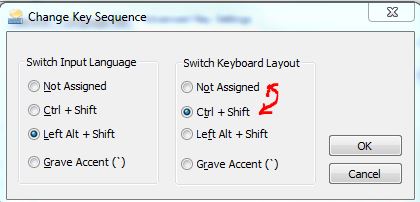
- If you cannot locate the keyboard icon you can get at this through the control panel.
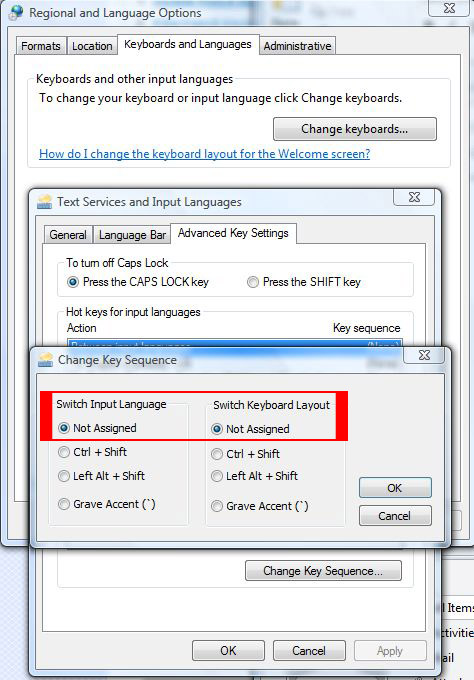
- Go to Regional and Language control panel.
- Select the keyboards and languages tab and click the change keyboards button.
This takes you to the language settings described in step 2 above.
Please share if you like what you read 🙂 See more tutorials by Victoria Web Solutions.

This is an excellent post. It’s a remarkably helpful post, awaiting a more new post. To get interior painters Edmonton, visit our website. Keep Blogging!
Thank you, Patrick and team! I have a neighbour who is Parisian ( a French speaking lady) and I always what to spell her name correctly with I send her an email or write her a note. I wanted to know how to go back and forth with the accent over the e(s) in her name. I usually copy and paste her name from the emails that she sends to me but after doing so, I can’t drop the accent over the e! You have taught me how to press shift and ctrl a couple of times to get back to normal on my keyboard. I appreciate your help!
Delightful to hear 🙂
I am at witès end (seeÉ) None of the above worked, also tried signing in, signing out, rebooting. Please help. Ièd be so grateful!
Worked for me, thanks!
Windows 10. On the bottom right of the Task Bar is the language ikon. Click on it and make sure it’s on English Canada or English US and not Not Canadian Multiligual Standar.
Pingback: Get rid of the É instead of question mark for Windows 10 | Website Design Victoria BC Canada Victoria Web Solutions
Thank you for the tip. It worked for me and I shall not forget. I often need it as it’s the proper letter to spell my daughter’s name but never knew how to get rid of it or how to get it! Really appreciate this.
Thank-you!!!
You’re most welcome
ALT + SHIT worked
lol
Dear Patric, i’m using MacBook Pro and canadian french keyboard. I tried what you taught. but it is not working out for me. É keeps coming up, instead of question mark. So frustrating. HelpÉ (Alright, wanted to type a question mark, but it’s just not coming up 🙂 )
Hi there – sorry you’re having troubles. Please try pressing “e” while holding the “option” key, take your finger off the option key then press “e” again. See if this works for you?
I did this method and it worked but now it wont, what do I do now
For my computer had to use Alt then shift key
Alt and Shift for me too
Hi,
i tried this method and coudlnt get rid of E when i press it in excel.
This isnt working for me…
Do you know what version of Windows you are running?
This happened today when my fat fingers pressed the magic key combination to generate E acute rather than the usual ? mark. Much appreciated!
Glad it worked for you Michael!
Hi there, this did not work. If I go to Control Panel to click on keyboard (no icon in Windows 10), it does not give me and of these options.
Any suggestions?
hi there – have a look at this article we wrote specifically for Windows 10. Let us know if this works for you?
Thanks very much Patrick!
I was stuck on that quite a few times and I could only restart my PC to render the issue.
That is not convenient most times of course.
A little fix goes a long way..isn’t that a quote?..or close?
It is now, and that fix fixed me on 5/11/2018
Thanks Again Patrick!
Hi there – so great to hear this helped you! Sounds like you need to coin that quote for yourself 😉 Cheers
So I am getting ” when I want@ and vice versa?
How do I fix?
Cheers, jenni
Hi Jenni – this may be the French Canadian or other keyboard you have enabled? Check your keyboard settings in the system tray, beside the time and change to the correct keyboard. Hope that helps?
Thank you!!! Ctrn+Shift did work for me..Thanks again
Good to hear 🙂
CTRL + SHIFT didn’t work for me BUT Alt + SHIFT did fix my issue with this problem.
Interesting! Well glad it worked for you either way 🙂
Thank you – I’ve seen a number of solutions to this problem, but this one actually works!
You’re most welcome, Helen. Glad we could be of help.
This didnt work for me. Any suggestionsÉ
Hi there – sometimes you have to press CTRL+SHIFT twice:
(press CTRL first and while holding press SHIFT, sometimes you have to do it twice in a row to disable.)
It works perfectly. Thank you
Super glad to hear Ramesh!
Thank you so much, Patrick!!
I appreciate your help. Your advice worked perfectly.
I hadn’t ever done this before but it was SO annoying…and no matter what I tried,
I couldn’t fix it!
I’m so appreciative of these kinds of sites that always help me out when I need it!
Thank you!!!!
Lisa : )
so happy to be of help Lisa. Thank you for the kind words!
What worked for me is shift+ctrl, not ctrl+shift.
Thanks Rod
awesome thanks for sharing!
my pleasure Paul!
This is literally the most frustrating thing. The crtl + shift doesnt work. Theres no keyboard icon. Theres no change keyboards button. What am I supposed to do
Try pressing CTRL+SHIFT twice in a row see if that works?
for me it is hold Ctrl+Shift then press the other Shift key… [Ctrl+Shift]+Shift
But you can also go here on Windows 10 and remove the multilingual keyboard
Control Panel\Clock, Language, and Region\Language\Language options
thanks for the feedback!
Hold ctrl+shift then pressing the other shift key is what disabled it for me as well 🙂
Great to hear, thank you Annette!
Thanks..that is the only one that worked for me this time. It happens all the time
This is a tricky one for sure. Glad it worked for you Violetta.
It’s shift+ctrl. Not ctrl+shift. That worked for me
Thank you Thank you. I was able to get my Dell keyboard to disable the French key and have a question mark, double quotes etc. by using you website suggestion. I had to press the Ctrl and Shift several times before I got it to work.
Great thank you.
Wonderful! Thanks
thyx
you are welcome!
You are my new hero! Thanks 🙂
Ah flattered 🙂
OMG! this just totally saved me so much pain.. i would reboot my PC every time this stupid thing would show up.. thanks… 🙂
Glad to save you time rebooting your PC 🙂 Cheers
Pingback: How To Get Rid Of Accented Letters On Keyboard | Information
Holding down Ctrl key while depressing the shift key is much simpler.
🙂
The fix described above is a PERMAMENT fix
Thank you. I had to press the ctrl and shift twice but it got rid of that annoying E.
Glad to hear it worked for you!
Great! Thank you so much, I found finally easy fix with your help.
The only thing I can’t find how to delete it permanently in my win 8 ( switch to “Not assigned).
Keyboard icon does not show these properties and no Regional and Language Options on my win 8 ( Separate Language and Region)
Hi Boris – glad we could help you with a easy fix! For changing it permanently, try this:
In “Control Panel” | “Clock, Language and Region” | “Language” click “Advanced Settings” in the left pane.
In “Advanced settings” click “Change Language bar hot keys”
In “Text Services and Input Languages” click “Change Key Sequence” button and disable the the key sequence by selecting the “Not Assigned” radio buttons
Let me know if that works?
Patrick
Can you help me please, i have really buggered it up, i have that funny e coming up on my commas now also
Ànyone, please help, still doing it
have you tried pressing CTRL+SHIFT twice to disable it?
It would NOT turn off for me either !! I finally had to go into the “control panel” then “language/region” then under input methods for the keyboard, get rid of “Canadian Multi-language” leaving only US. However, now when I go back to review this, it says “English Canada”. Anyhow, that solved it 🙂
great to hear Tamara
Hi Stephanie – please check the email I sent you and let me know if you need further help? Regards
A miracle- I’ve been struggling with this issue for years at home and at work. Such a quick fix. Thank you !
A Christmas miracle 😉 Glad we could help you out Rod!
Awesome – Thank you!!! 🙂
You’re very welcome!
THANK YOU PATRICK MY ? MARK IS WORKING NOW TANKS TO YOU
BLESS YOU
ARIE
Hi Arie! Well that is fantastic to hear! Appreciate the comment.
Pingback: How To Get Rid Of French Accent E | Information
Thank you! That was driving me crazy! I found the quick fix before but your permanent fix is so helpful so I don’t have to keep looking up what to do.
Wonderful to her Karen 🙂
Pingback: French Keyboard How To Get Rid Of | Information
Every time my kid plays on Steam this happens to me and I WAS rebooting my pc to fix it… this is much easier, thanks a heap!
Oh no! Hope this saves you from rebooting 🙂 Cheers
Awesome – this stuff worked. Thank you so much!
Your very welcome! Thanks for the comment.
Hello,
I am having trouble removing these symbols from when I type question marks (Éé). Please help!
I believe I am using Windows 10 on a newer HP desktop.
Thank you!
Hi Paulette. Try pressing both the CTRL+SHIFT button (may have to do this twice) and try the ? mark again. Patrick
Thanks for getting back to me, glad the issue is resolved!
Hello, just want to add, don’t do it tons of time because it will only frustrate you more, just like it did for me. I forgot how to do it as I have a sticky note at work but not at home. I was doing it right the first time but pressed the keys way too many times.
Found your site by googling. Great site and very informative.
Thank you Toni, appreciate the comment and glad you got it sorted. Cheers
It worked, thank you so much!
Oh good! I’m glad it worked for you and I appreciate the comment. Cheers
excellent . it worked. thanks
Glad to hear Greg!
Pingback: How To Get Rid Of Weird Symbols In Word 2003 | WorldsBank
Thank you soo much. Helped soo much on skype when i put a ? it would put the weird thing then id seem like an idiot xD
You’re welcome!
Thank you!!!!! I was in the middle of some assignment when my keyboard setting changed… Thank you for your tip that you have posted here to help many like us. :))
Glad to hear and good luck with the assignment!
Thanks I had to reboot to get it working
your welcome!
Thank you! I thought it was ctrl – alt – shift, but this fixed everything!
???ÉÉÉ???
Great to hear! Cheers
Thanks, very clear and simple instructions to follow!
Hi there! This blog post couldn’t be written any better!
Reading through this post reminds me of my previous roommate!
He always kept talking about this. I most certainly will send this information to
him. Pretty sure he’ll have a good read. Thank you for sharing!
No help required.
Just want to say thanks for help with a keyboard issue!
Dale
Appreciate the feedback Dale, glad to be of help!
you ‘f’ing rock!!!
Haaaa, right on Mike! Good to hear.
Thank you so much!!!
You’re welcome! Thanks for the thanks 🙂
Glad to be of help!
If it didn’t work for you it may be because you went through your control panel and changed the key sequence to “not assign” and “not assign” before pressing ctrl + shift to make your keyboard go back to normal.
You need to first see what your key sequence is to make your keyboard go back to normal Control Panel > Language and Regions > change keyboard > change sequence. Then you press that key sequence once your keyboard is back to normal, then you may click “not assign” to disable your keyboard from change the key functions.
Thanks gsidhu for helping out!
Hi again Patrick, Please note that I managed to solve the problem. In the end, I simply shut down the computer and re-opened it and it must have gone back to default… I can’t believe that I never thought of the old “re-boot” in the first place. Using IT Help 101!
Thank you for looking into it for me!
??? (just to prove that it worked 🙂
John
Good to hear John, thanks for the post!
Hi Patrick, unfortunately this didnèt work for me. Do you have any other suggestionsÉ (As you can see the apostrophe and question mark are not working, as they still are showing french accents, even though I only have the Canada-U.S. language and the International U.S. language chosen (nor French language). I live in Canada. Any other thoughtsÉ
Not sure if it matters; but I am using an Acer Aspire One computer. It was working fine until I hit something by accident and then I messed around with the languages, as per your suggestions.
The odd thing is that the symbols work properly when I am in Word 2003 (yep, a bit old); but not in my Yahoo emails or when I complete forms online. Please advise.
Thank you!
You made this fix very easy. Thank you!
So glad to hear. This shortcut has caused a lot of issues.
Cheers!
Thanks you made my day!
Very glad to hear! Thanks for your comment.
Thanks! That was super annoying!
Get rid of the É instead of question mark
I simply want to mention I am beginner to blogging and site-building and actually liked this page. Very likely I’m going to bookmark your blog post . You certainly come with great writings. With thanks for sharing with us.
Appreciate the recommendation. Let me try it out.
thanks writer prada outlet
YESYESYESYES!!THANK YOU
Oh thank G-d! This has been driving me crazy! Thank you so much!
this don`t working
Thanks Man. This was a pain!!
thanks so much!!!
itès not working for me! HEEEEEELP!
This is such annoying “feature.” It should be defaulted disabled.
When are you going to post again? You really inform me!
THANK YOU!!!
This has been driving me nuts for months. It’s such a relief to permanently solve this problem.
Thank you for helping out, great info .
thanks a lot. it worked!
Thank you so much. I did a lot of searching over the Internet before I came across your simple instructions to permanently disable that feature.
i love you!!
THANK YOU! THANK YOU!
I was able to get my HP keyboard to disable the French key and have a question mark by using your website suggestion.
Great.
MB