

Many of you probably already have it, but may not have it configured properly. If you have a wireless router at home you should password protect it.
There are two types of passwords you can put on a wireless router:
- To secure any changes being made to the router
- To lock down from people using your signal
Secure the Router
Depending on the router type but you are going to type in the IP address into your internet browser (Internet Explorer, Firefox, Chrome, Safari etc) to access the configuration page. This number will differ from brand.

D-Link Router = 192.168.0.1
Linksys Router = 192.168.1.1
Belkin Router = 192.168.2.1
Apple – 10.0.1.1
ASUS – 192.168.1.1
Buffalo – 192.168.11.1
Netgear – 192.168.0.1 or 192.168.0.227
You’ll be presented with user ID and password. Those too will also vary. See below for more.
D-Link Router = User ID: admin = Password = <none>
Linksys Router = User ID: admin = Password = <none>
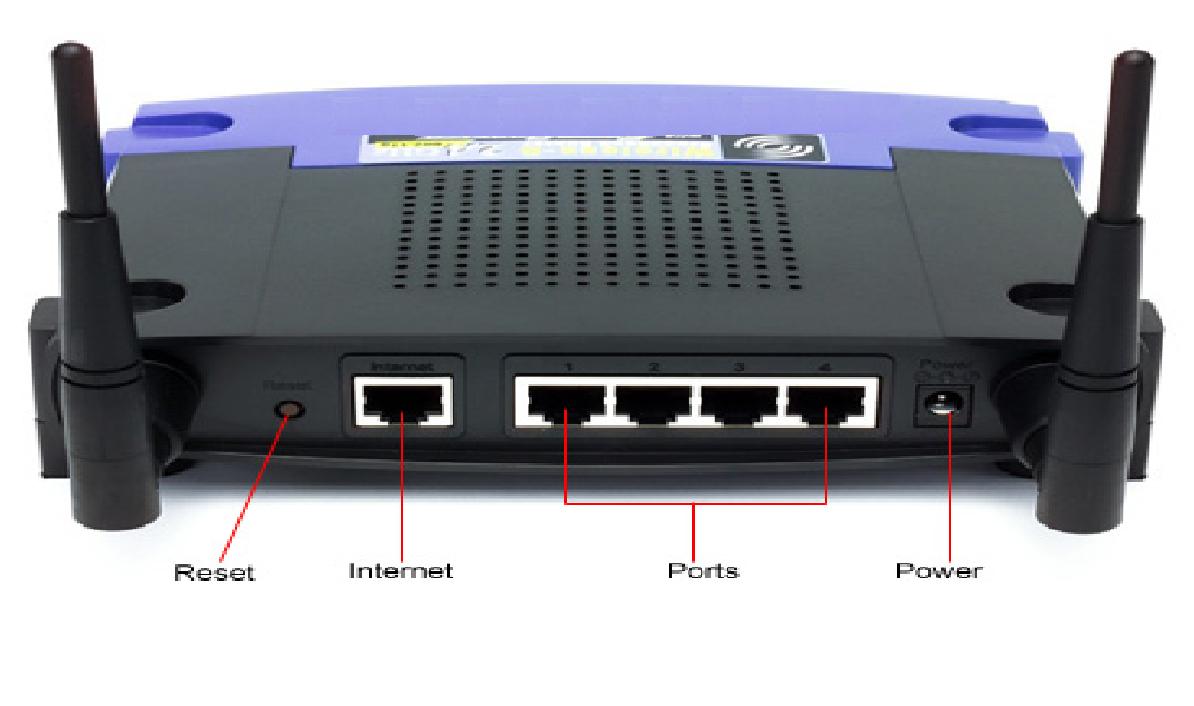
Worst case scenario, you can always hit the RESET button for 10 seconds. This will restore the system to the factory defaults. Here is the back of a Linksys router:
Some router default user names and passwords are:
Default user names:
- Linksys BEFW11S4, WRT54G: admin
- Linksys EtherFast Cable/DSL Ethernet routers: Administrator
- Linksys Comcast routers: comcast
- All other Linksys routers: [none]
Default passwords:
- Linksys BEFW11S4: [none]
- Linksys Comcast routers: 1234
- All other Linksys routers: admin
Wireless Password and SSID name
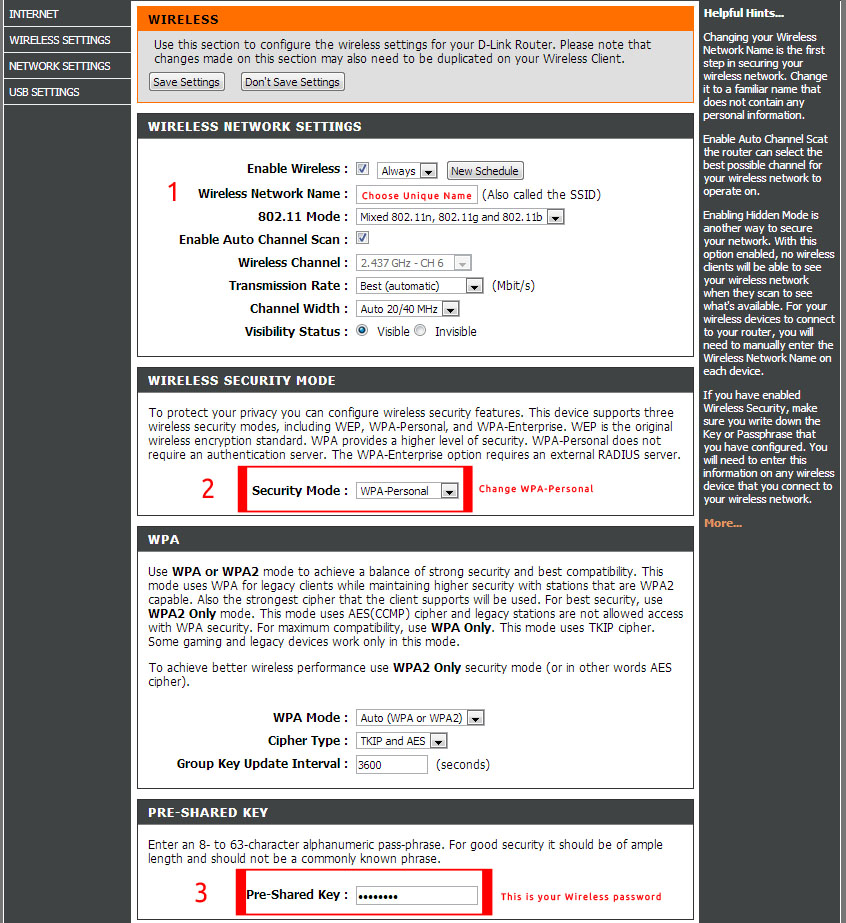
See more instructions here http://www.ehow.com/how_2253625_secure-wireless-router.html

Secure your wireless router – keep your information secure
Woah! I’m really loving the template/theme of this blog.
Hello there! Do you know if they make any plugins
to assist with SEO? I’m trying to get my blog to rank for some targeted keywords but I’m not seeing very good gains.
If you know of any please share. Many thanks!
Hi there – yes try this plugin by Yoast – http://yoast.com/wordpress/seo/
Greetings! Quick question that’s totally off topic. Do you know how to make your site mobile friendly? My website looks weird when browsing from my iphone4. I’m trying to find a template or
plugin that might be able to fix this issue. If you have any recommendations, please share.
Cheers!
Yes. Check this site out – http://victoriamobilemarketing.ca/mobile-marketing-solutions/mobi-friendly-websites/
Greetings! Very useful advice in this particular article!
It is the little changes that will make the biggest changes.
Many thanks for sharing!
It was a excitement locating your site yesterday. I came here right hoping to learn something new. And I was not dissatisfied. Your well thought out ideas for new events like this. Thank you for this idea and sharing your knowledge.